Main Content
Windows (automatic)
Entry requirements
- Computers managed by OPSI are updated automatically; please do not reconfigure the WiFi on them yourself.
- You have the login credentials for your university account.
- The operating system should be updated to the latest version available for your device.
- Your device must support WPA3-Enterprise.
- Make sure you have the latest drivers for your Wi-Fi adapter installed.
Adding the configuration profile
1. Download the geteduroam app from the developer's website.
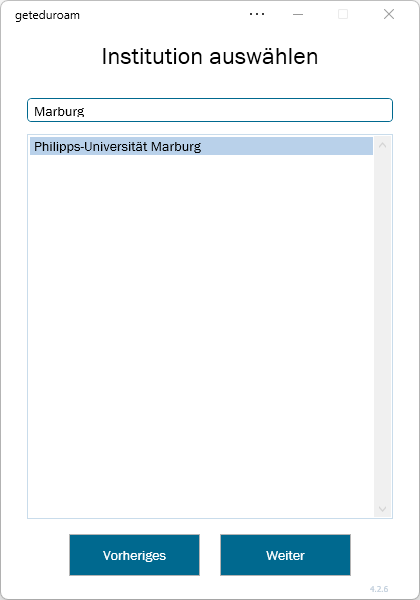
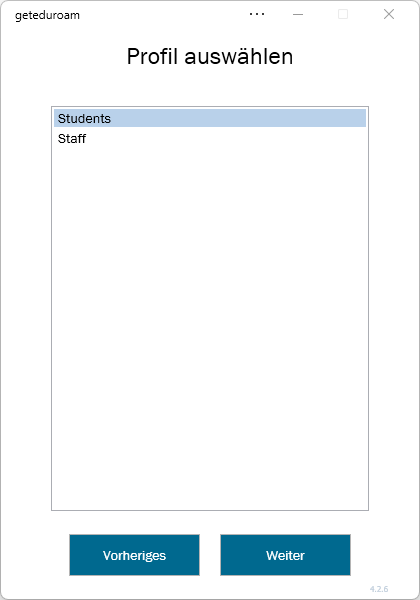
2. Open the app and select Philipps-Universität Marburg as Organization and your user group (Students or Staff) as Profile.
3. Install the certificate, if necessary.
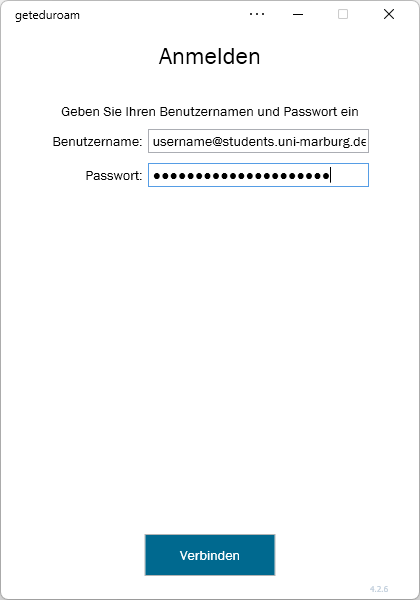
4. Enter username and password and click on "Connect":
- Students: username@students.uni-marburg.de
- Staff: username@staff.uni-marburg.de
Please note: The eduroam username is not an e-mail address, despite the similarity. Aliases such as firstname.lastname@staff.uni-marburg.de do not work!
FAQ
Which WiFi adapter is built into my device?
1. Click “Start” (or press the Windows key) and search for “Device Manager”.
2. Open Device Manager and expand the “Network adapters” category.
3. There should now be several entries there; look for the one that includes “Wi-Fi” or “Wireless LAN”.
- Example: Intel(R) Wi-Fi 6E AX211 160MHzWhat version of the WiFi driver is currently installed?
1. In Device Manager under “Network adapters” right-click the installed WiFi adapter and select “Properties”.
2. On the “Driver” tab, you can see which driver version is installed and when the driver was released (driver date).
- Note: The driver date is not the date you installed the driver.How do I update the WiFi driver?
1. Find out the manufacturer, adapter model, and driver version for your device.
2. Now search for the WiFi adapter in your web browser and add “driver” at the end.
- Example: Intel Wi-Fi 6E AX211 driver
3. Find and open the manufacturer’s website and check if a newer version is available.
Note: Please download the new driver exclusively from the manufacturer’s website; otherwise, you may inadvertently install malware!
4. If you can’t find a compatible driver, many manufacturers offer support tools for automatic detection and installation.
- Example: Intel Driver & Support Assistant (Intel DSA)How can I tell if my device has already been updated to the new WiFi settings?
This can usually be identified by the fact that the so-called anonymous or external identity is set to “eduroam-2026.”
1. Open Settings → Network & Internet → Wi-Fi → eduroam Properties.
2. Click “Edit” under “Advanced Wi-Fi network properties.” In the next window, select the ‘Security’ tab and click “Settings” next to PEAP.
3. In the Protected EAP properties, the following should be entered under “Enable Identity Protection”: eduroam-2026
4. If this is not the case, or if, for example, only “eduroam” is listed there, the device has not yet been updated.
If the connection does not work, contact the helpdesk team.
Please include your username (uid) and the WiFi-MAC-address of the device with your inquiry.
As of: 2026-08
OS: Windows 11 (25H2)
App: 4.2.6